
What Is SNI?
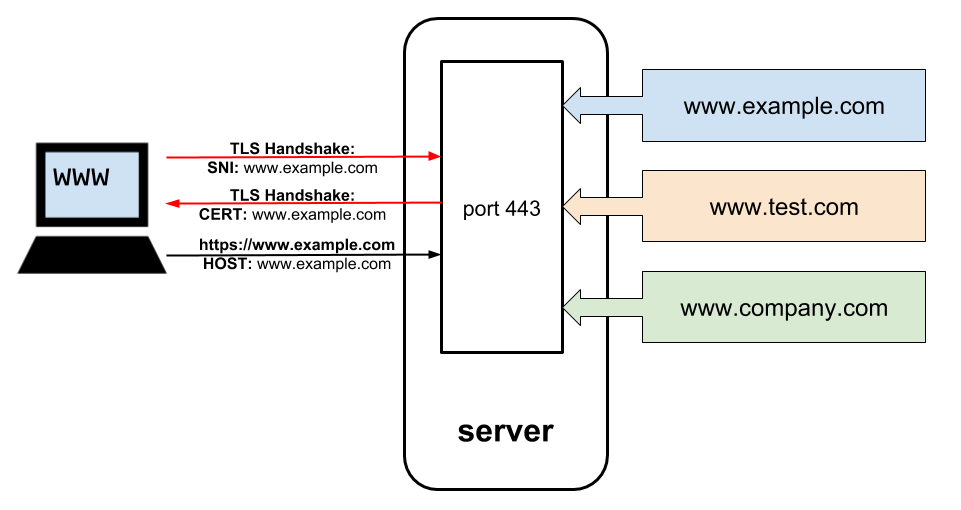
SNI stands for Server Name Indication. It is an extension of the TLS protocol that allows a client to tell a server which hostname it wants to connect to during the TLS handshake.
This is important when multiple websites share the same IP address. For example:
203.0.113.10
├── example.com
├── shop.example.com
└── api.example.comEach website can have its own TLS certificate. The server needs to know which certificate to use, but the TLS handshake happens before the encrypted HTTP request containing the Host header.
SNI solves this problem by including the hostname in the TLS ClientHello message:
Client → Server

TLS ClientHello
SNI: shop.example.comThe server can then select the correct certificate and continue establishing the secure TLS connection.
In simple terms, SNI tells the server which website the client wants before the encrypted HTTP communication begins.
SNI is especially important for HTTPS virtual hosting, where many websites share the same IP address.
Exceptions: Legacy Clients and Multiple Network Interfaces
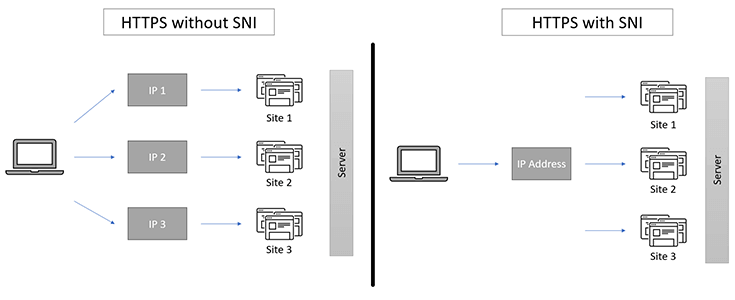
SNI is widely used by modern HTTPS clients and servers. However, some legacy clients do not support SNI. In environments where these clients must still be supported, SNI cannot be relied upon to select the correct TLS certificate.
In such cases, separate IP addresses or other architectural solutions may be required for websites using different TLS certificates.
Another situation where multiple network interfaces may be required is when an EC2 instance needs to be connected to two separate networks. For example, you may want to keep a management network separate from the application network.
Multiple network interfaces can also be required when an application or network architecture specifically needs them, such as with network or security appliances.
In these situations, an EC2 instance can use multiple Elastic Network Interfaces (ENIs), with each interface connected to a different network or subnet.