
AWS CloudFormation from yaml template
To create a WordPress site on AWS, we can use the CloudFormation service. We simply upload a prepared wordpress.yaml template that contains the instructions for creating the WordPress site and all the required resources.
GitHub repository with the wordpress.yaml template:
How to deploy
- Open the CloudFormation service in the AWS Console.
- Click Create stack.
- Under Specify template, choose Upload a template file and select the
wordpress.yamlfile. - Enter
wordpressas the Stack name. - Under Parameters, enter
mykeyfor KeyName.
NOTE: An EC2 key pair namedmykeymust already exist in the AWS Region where you are creating the stack. AWS stores the public key, while you should keep the corresponding private key (.pem) securely on your computer. - Add the following tag:
Key:system
Value:wordpress - Continue through the remaining steps and click Submit on the final page.
Now wait a few minutes for CloudFormation to finish creating the resources. Once the stack has been created, go to Outputs, where you will find the addresses for your WordPress site.
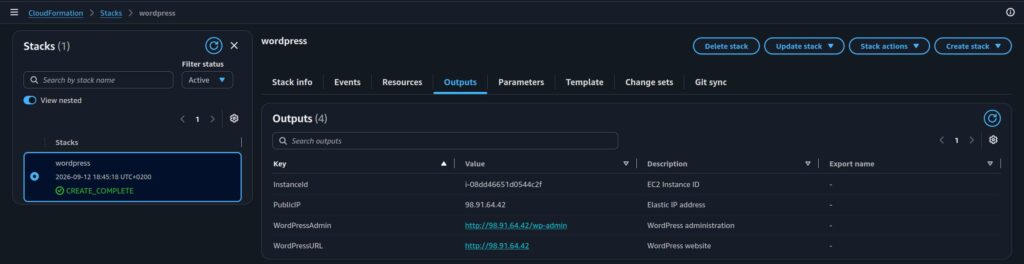
Congrats! You have just created your first website on AWS!